



Custom software. Built for automation.

Your business.Your workflow.Your software.

You have a way of running things. We build custom software and automation around it.

Explore what’s possible

Less administration. More momentum.

Give every handoff
a clear next step.

When the next step depends on copying a record, chasing an approval or checking another spreadsheet, your team becomes the connection between your tools. We build that connection into the software.

EnquiryApprovalScheduleDeliveryInvoiceFollow-up

Selected product work

Built to handle
the work behind the work.

Founder-built software

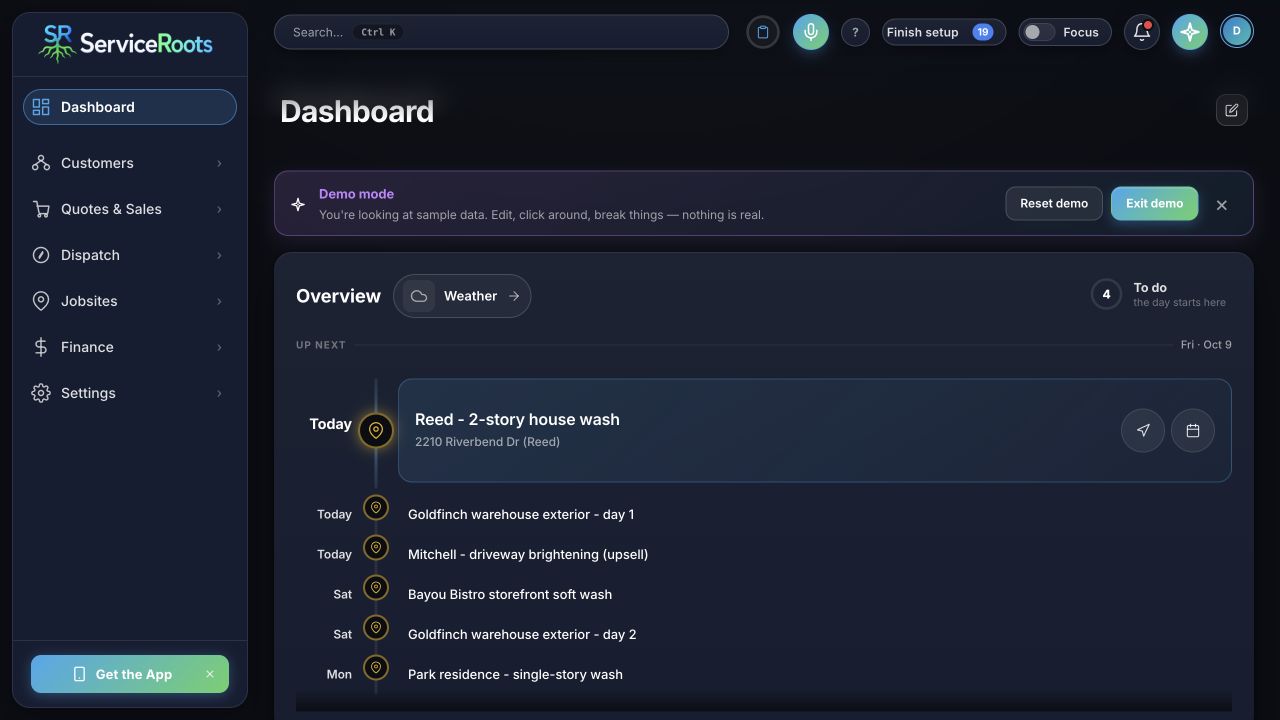
An operations product built by Formative’s founder. Scheduled work, customer context and estimates brought into a purpose-built interface.

ServiceRoots

Operations softwareView full screen
ServiceRoots dashboard showing a schedule of upcoming work using sample data
Actual product screens shown with sample data. This is a founder-built product, not a client case study.
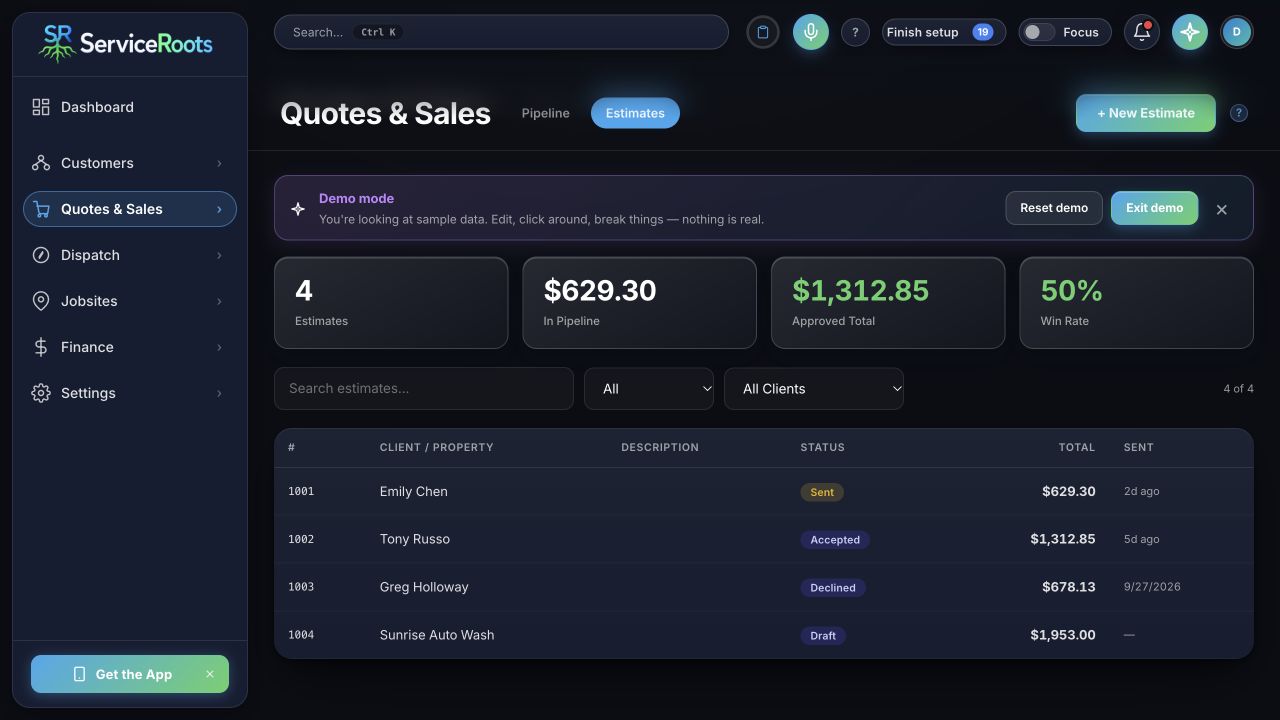
Inside the product View the estimates screen
ServiceRoots estimates screen showing draft, sent, accepted and declined estimates with sample data
Estimate visibility: review each record and its current status. All figures shown are sample data.

What we build

Start where
the work gets stuck.

See how a connected workflow can carry information through the next handoff. Each example is a starting point for your own process.

01 / Enquiries & quotes

Give every enquiry a clear next step.

Bring the details together before the first call. Shape a quoting process around the services you offer and the information you actually need.

  • Capture the right details
  • Prepare the quote
  • Prompt the follow-up
Start with this workflow
Illustrative workflowReview stays with your team
The gap

Details copied from an inbox. A quote rebuilt by hand. A follow-up left to memory.

01
When this happensNew quote request
Keep the context together
Request
New project enquiry
Details
Scope + requirements
Next step
Team reviews proposal
02
The next step is readyFollow-up queued after review

Example process. The workflow, tools and approval points are defined with your team.

02 / Scheduling & handoffs

Put the plan where the team can use it.

Connect approved work to your schedule. Keep requirements, documents and changes with the task, so the next person has what they need.

  • Confirm the work
  • Coordinate the team
  • Keep the context together
Start with this workflow
Illustrative workflowReview stays with your team
The gap

An approval in one tool. Dates in another. The delivery team chasing the missing context.

01
When this happensProject approved
Keep the context together
Project
New client onboarding
Details
Requirements + documents
Next step
Assign owner and dates
02
The next step is readyA clear handoff to the delivery team

Example process. The workflow, tools and approval points are defined with your team.

03 / Operations & admin

Let completed work move the next step forward.

Build the checklists, records and status updates that match your operation. Let approved work trigger the next admin step when you’re ready.

  • Record the work
  • Review completion
  • Prepare the invoice
Start with this workflow
Illustrative workflowReview stays with your team
The gap

Completed work waiting in a message thread while someone prepares the paperwork.

01
When this happensTeam marks work complete
Keep the context together
Record
Checklist + deliverables
Review
Manager confirms completion
Next step
Prepare invoice draft
02
The next step is readyThe next admin step is ready

Example process. The workflow, tools and approval points are defined with your team.

04 / Follow-up & retention

Make the next conversation easier to remember.

Build reminders around the work you do and the customers you serve. Keep routine follow-up moving while leaving your team in control of what gets sent.

  • Use the customer history
  • Set the reminder
  • Review the message
Start with this workflow
Illustrative workflowReview stays with your team
The gap

Customer history scattered across notes, with the next conversation easy to miss.

01
When this happensCustomer follow-up is due
Keep the context together
Context
Previous work + notes
Message
Draft ready to review
Next step
Team approves outreach
02
The next step is readyA timely follow-up, with oversight

Example process. The workflow, tools and approval points are defined with your team.

Our approach

Understand first.
Build with purpose.

A clear scope, visible progress and testing with real users. Every stage makes the next decision easier.

  1. 01

    Map the real work.

    Walk through the workflow, the tools and the exceptions with the people who use them. Identify what should change and what already works.

  2. 02

    Make the scope clear.

    Define the outcome, integrations, responsibilities and review milestones. Agree how the work will be evaluated before building.

  3. 03

    Build. Test. Refine.

    Review working software against real scenarios, including the awkward cases. Refine it with the team before introducing it to the operation.

  4. 04

    Plan the handoff.

    Agree the rollout, documentation, training and support required. Clarify system access, ownership and ongoing responsibilities in the project scope.

A defined first step

One useful workflow, with clear boundaries and an outcome the team can evaluate.

Clear responsibility

Access, ownership, third-party services and maintenance discussed before the build.

An agreed support plan

The level of ongoing support and future changes scoped to the system and your team.

FormativeCustom means yours.

The right starting point

Built for real
operational complexity.

For established businesses with recurring work, multiple tools and handoffs that cost time. The industry can vary. The starting point is one operational gap worth solving.

  • A recurring workflow has a clear owner.
  • The same information moves between people or tools.
  • A missed handoff creates delays, rework or extra administration.

A few useful answers

Before we
get into it.

Do we have to replace the software we already use?

Not necessarily. We start with your existing tools and look at where they fit. Depending on the workflow and available integrations, the right solution may connect those tools, add a missing piece or replace a process that no longer works.

Do you work with businesses in any industry?

Yes. We start with your operation, the tools you use and the problem you want to solve. The workflow and available integrations shape the solution—not a fixed industry template.

What can you automate?

Repeatable steps such as capturing information, moving information between compatible tools, preparing documents and prompting follow-ups. What’s possible depends on your tools, access and workflow. Decisions and exceptions can stay with your team.

How much does custom software cost?

The scope determines the investment: the workflow, integrations, data and level of customization. After the initial conversation, we define the next discovery or build step, its deliverables and its cost before work begins.

Can we start with one problem?

Yes. A focused workflow gives the project a clear purpose and makes it easier to evaluate whether the solution fits. Broader changes can be considered when there’s a reason for them.

What happens after the software is built?

Rollout, documentation, training and maintenance are part of the scope discussion. We agree what your team will manage, where support is needed and how future changes will be handled.

Who controls the software and data?

System access, source-code ownership, data handling and third-party licenses are clarified in the project agreement. Those details depend on what we build and the services it connects.

Start with a conversation

Bring the workflow.
We’ll work through it.

You do not need a specification. Bring one recurring bottleneck, the tools involved and the result you want.

  1. 01

    Show us what happens today.

    Walk through the steps, handoffs and workarounds.

  2. 02

    Look at where the tools fall short.

    Explore the gaps, exceptions and integration options.

  3. 03

    Choose a sensible next step.

    Decide whether to connect existing tools, scope a custom build or investigate further.

What you leave with

A clearer view of the problem and a practical next step. If deeper discovery is needed, we will define that work before a build.

Your starting point

Prepare for the conversation.

A few details help make the first conversation useful.

Consultation preview — scheduling is not available yet and sending is not connected yet. Prepare a workflow brief below; nothing is submitted.

Creates a text file on your device. Nothing is sent or stored by this site.